When Visual Appeal Meets Usability
A comparative usability study of LinkedIn Jobs and Indeed
Problem & Target Users
Understanding how interface design affects the experience of finding and filtering job opportunities.
My Role
UX Researcher
Academic research at the University of Trento, independently conducting the comparative study design, participant sessions, and qualitative and quantitative analysis.
Project Type & Context
Academic UX research · Cognitive Ergonomics · University of Trento
Methods & Participants
01 The Challenge
Online job searching is cognitively demanding: users must parse dense text listings, evaluate relevance under time pressure, and manipulate multi-parameter search filters simultaneously.
Both LinkedIn Jobs and Indeed support the exact same fundamental goal—discovering, filtering, and applying to relevant employment opportunities. However, the two platforms organize information and structure filtering interactions in fundamentally different ways:
LinkedIn Jobs: Rich, Social & Split-Panel
Integrated into a professional network. Features a modern split-panel layout, visual corporate branding, applicant insights, and active filter pills along the top bar.
Indeed: Direct, Minimalist & Filter-First
A search-engine paradigm prioritizing direct keyword queries, prominent category checkboxes, and an uncluttered list without social or promotional distractions.
“How do interface design and filtering workflows influence perceived usability and mental effort during job-search tasks?”
02 Research Approach
I designed and executed a comparative usability study using a within-subjects experimental design with 20 participants (university students and early-career job seekers in the UK).
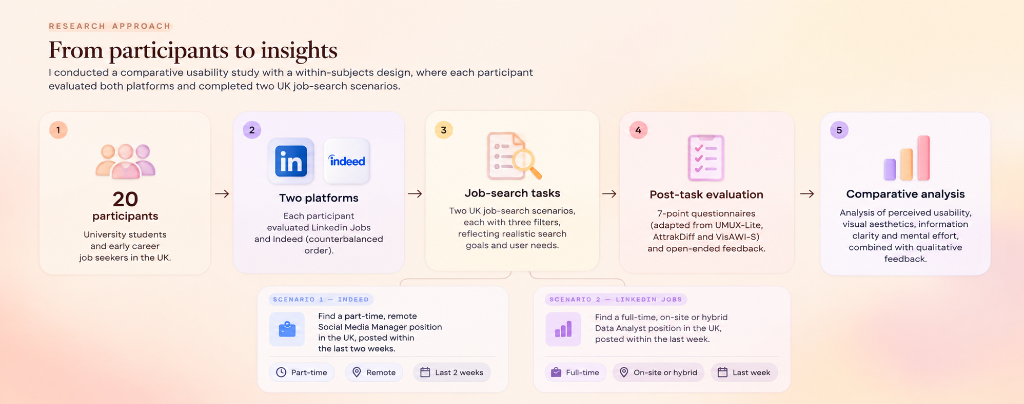
Figure 01: Within-subjects experimental procedure and UK job-search task scenarios.
Experimental Protocol & Task Scenarios
To prevent direct memorization of listings while ensuring comparable cognitive complexity, participants completed two different UK job-search scenarios. Each scenario required applying exactly three specific search filters:
Find a part-time, remote Social Media Manager position in the UK, posted within the last two weeks.
Find a full-time, on-site or hybrid Data Analyst position in the UK, posted within the last week.
Following each task, participants completed 7-point Likert questionnaires adapted from validated UX and ergonomics frameworks (UMUX-Lite for perceived usability, AttrakDiff for pragmatic and hedonic qualities, and VisAWI-S for visual aesthetics), complemented by open-ended qualitative comments.
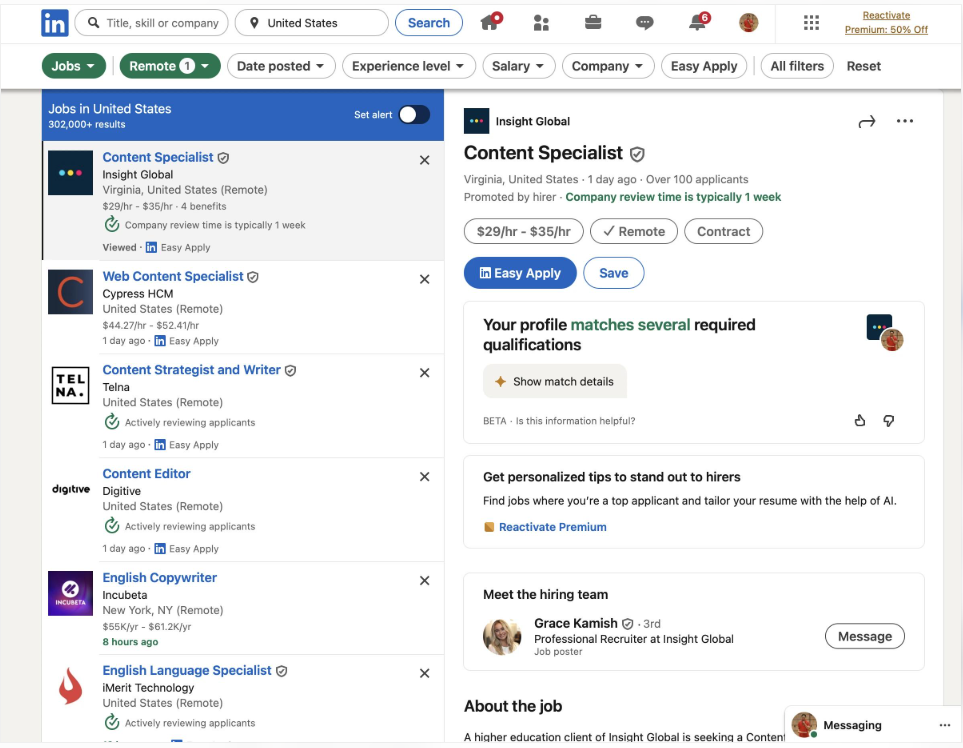
Figure 02: LinkedIn Jobs search interface displaying active filter tags and split-panel listing preview.
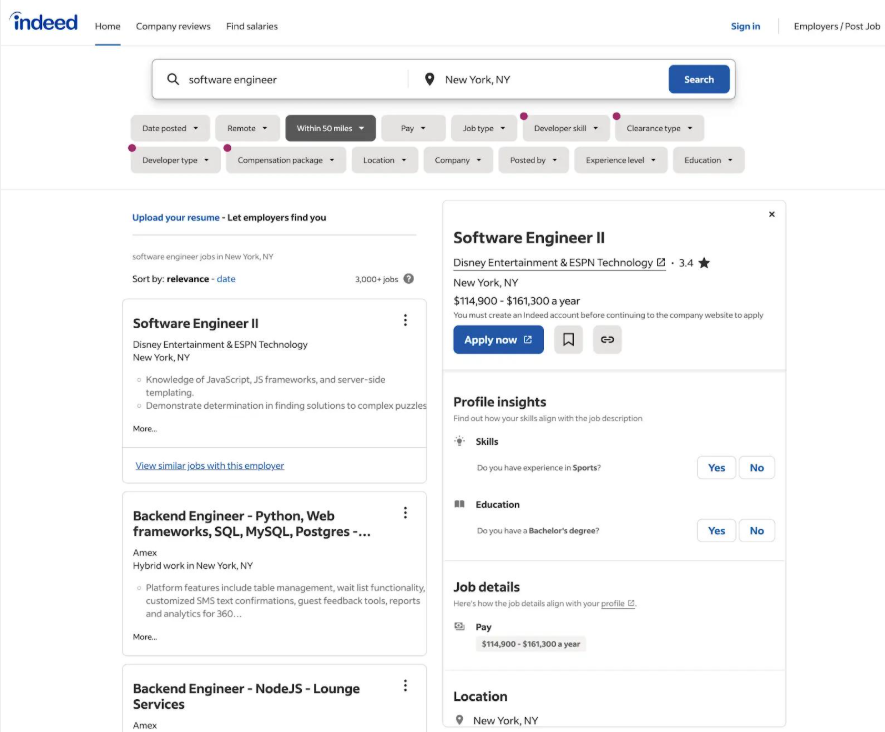
Figure 03: Indeed search interface displaying prominent filter controls and direct listing details.
03 Key Findings
Which platform felt more intuitive?
Forced-choice post-study evaluation (n = 20 participants)
LinkedIn Jobs
- Modern visual presentation and clean layout hierarchy.
- Familiar navigation patterns aligned with daily social apps.
- Appreciated split-panel layout enabling simultaneous scanning and reading.
- Inconsistent search result relevance on specific keyword combinations.
- Filter accuracy discrepancies requiring manual re-checking.
- Certain mobile interactions and responsive reflow friction.
Indeed
- Direct, straightforward filtering workflow with clear facet controls.
- Uncluttered, distraction-free interface focused purely on listings.
- Readily accessible job specifications without promotional noise.
- Less modern and visually appealing appearance.
- Perceived as somewhat visually outdated by participants.
- Reported mobile interruptions, unexpected modal prompts, or loading delays.
Perceived intuitiveness and functional efficiency do not always align.
Methodological note: 100% of participants successfully completed both tasks. The 62.5% vs. 37.5% preference distribution reflects subjective perceived intuitiveness rather than statistically significant performance differences or objectively measured time savings.
04 Takeaways & Reflection
Visual clarity shapes confidence.
Layout orderliness, typography, and familiar design patterns significantly influence how intuitive an interface feels at first glance, bolstering user self-efficacy during complex tasks.
Core functionality still matters.
Attractive presentation cannot compensate for frustrating or unreliable filtering. When multi-parameter filters fail to return accurate matches, initial aesthetic goodwill rapidly erodes.
Preferences need context.
Prior platform familiarity strongly mediates how users judge usability. What feels "intuitive" is often a reflection of existing mental models shaped by habitual daily usage.
Exploratory academic study with a sample of 20 university students and early-career job seekers. Key constraints include reliance on self-reported evaluations rather than automated interaction logging, potential familiarity and learning effects inherent in within-subjects testing, and the intentional use of two different scenarios across platforms.
A compelling next step for this research is combining subjective usability evaluations with objective behavioral measures—such as precision task completion times, filter error and re-query frequencies, and eye-tracking gaze fixations. Doing so would bridge the gap between perceived aesthetic satisfaction and actual cognitive workload during information-seeking tasks.